Integrating the Gift Bows Seamless Pattern into Your Creative Workflow
In the fast-paced world of digital design and small business production, efficiency is just as critical as creativity. Whether you are a freelance graphic designer managing multiple client deadlines, a hobbyist preparing for the holiday rush, or an entrepreneur launching a seasonal product line, the assets you choose can significantly impact your output quality and speed. The Gift Bows Seamless Pattern represents more than just a decorative image; it is a functional asset designed to streamline the production of festive materials. By understanding how to integrate this high-resolution digital file into your existing processes, you can reduce preparation time while maintaining professional standards across various mediums.
Understanding the Asset and Its Technical Specifications
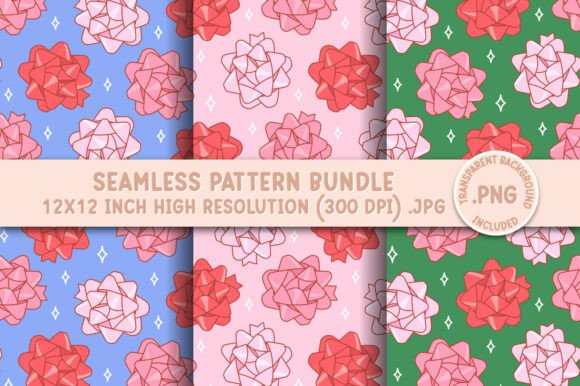
Before incorporating any digital asset into a project, it is essential to understand its technical constraints and capabilities. This specific pattern is delivered as an instant download, meaning there is no shipping wait time, allowing for immediate integration into urgent workflows. The package typically includes three JPEG files and one transparent background PNG file, all sized at 12 x 12 inches with a resolution of 300 DPI (dots per inch).
The 300 DPI specification is crucial for professionals. It ensures that whether you are printing large format party decor or sublimating designs onto tumblers, the output remains crisp without pixelation. The "seamless" nature of the pattern means the edges align perfectly when tiled, allowing you to cover surfaces of any size without visible breaks or awkward cuts. However, it is important to note that these are non-editable raster files. You cannot change the colors or vector paths within the file itself. This distinction dictates where the asset fits in your workflow: it is best used as a foundational layer or a finished texture rather than a modifiable element requiring color customization.
Strategic Placement in the Project Lifecycle
Effective project management involves knowing when to introduce specific resources. The Gift Bows Seamless Pattern fits naturally into the execution phase of a project, specifically after the conceptual planning but before final production.
Pre-Production Planning
During the planning stage, determine if this pattern aligns with your brand's aesthetic or your client's vision. Since the colors and textures shown in product mockups are examples of potential usage, you must visualize how the bow motif complements your specific color palette. If you are designing a cohesive holiday collection, decide early on if this pattern will serve as the primary background, a secondary accent, or a lining for packaging. This decision prevents mid-project pivots that can delay timelines.
Execution and Implementation
Once the plan is set, the implementation phase begins. Because the files are high-quality and detailed, they may take a moment to load in certain design programs, especially on older hardware. Patience during this loading phase is a small trade-off for the clarity the 300 DPI resolution provides. When working with software like Adobe Photoshop, Illustrator (placed as a linked file), or Canva, import the PNG file if you need to layer other elements over the bows without a white box obstruction. Use the JPEGs for full-background applications where transparency is not required.
Post-Production and Quality Control
After applying the pattern, perform a quality check. Remember that screen colors can vary slightly from print outputs due to monitor calibration and printer profiles. Always run a test print on the actual material you intend to use—whether it is sublimation paper, cardstock, or fabric. This step ensures that the festive reds and greens of the bows appear vibrant and true to your expectations before committing to a full production run.
Compatibility with Tools and Platforms
A versatile digital asset should interact smoothly with the tools you already own. The Gift Bows Seamless Pattern is optimized for a wide range of popular crafting and design platforms:
- Cutting Machines: For users of Cricut or Silhouette, this pattern is ideal for print-then-cut projects. You can print the seamless design onto printable vinyl or cardstock and then cut out specific shapes, such as gift tags or ornament toppers, leveraging the repeating motif for consistency across multiple items.
- Sublimation: The high resolution makes this pattern perfect for sublimation on hard goods. Whether you are coating mugs, t-shirts, or tumblers, the seamless repeat ensures that the design wraps around curved surfaces without obvious seam lines, creating a professional, store-bought appearance.
- Digital Scrapbooking and Journaling: For digital planners and scrapbookers, the 12x12 inch size is the industry standard. You can drag and drop these files directly into your digital layouts to create instant holiday-themed pages without needing to construct complex backgrounds from scratch.
- Fabric Design: If you utilize print-on-demand services for fabric, the seamless nature of this file allows you to upload it directly to generate continuous yardage. This is particularly useful for creating matching holiday aprons, table runners, or gift bags.
Workflow Optimization Tips
To maximize the value of this instant download, consider organizing your digital assets systematically. Create a dedicated folder on your drive labeled "Holiday Assets 2024" and sub-categorize by file type (JPEG vs. PNG). This organization saves valuable time when you are in the middle of a creative sprint and need to locate the correct file version quickly.
Furthermore, leverage the repeatability of the pattern to create scale variations. In your design software, you can tile the 12x12 inch image to create a larger canvas, then scale it down to create a micro-pattern for subtle backgrounds, or keep it large for bold statements. This flexibility allows a single purchase to serve multiple purposes within the same project, enhancing cost-efficiency.
It is also vital to manage expectations regarding file editing. Since the files are non-editable JPGs and PNGs, do not attempt to isolate individual bows using magic wand tools if the background is complex; instead, use the provided transparent PNG for layering. If you require specific color shifts that the original file does not offer, consider using blending modes in your photo editing software to tint the entire layer, rather than trying to edit the source file which is not possible.
Long-Term Utility and Business Applications
For small business owners and marketers, seasonal assets like the Gift Bows Seamless Pattern are investments in brand consistency. By using the same high-quality pattern across your social media graphics, physical packaging, and website banners, you create a recognizable visual identity for the holiday season. This consistency builds trust with customers and elevates the perceived value of your products.
Educators and community leaders can also utilize these patterns for creating engaging classroom materials or event decorations. The instant download feature ensures that last-minute needs can be met without waiting for physical supplies to arrive. Whether you are printing party favors for a school event or designing certificates for a workshop, the professional quality of the 300 DPI files ensures the final result looks polished.
In conclusion, the Gift Bows Seamless Pattern is a robust tool for anyone looking to enhance their holiday projects with efficiency and style. By respecting its technical specifications, integrating it thoughtfully into your workflow, and utilizing its compatibility with modern crafting tools, you can produce high-quality results that stand out. Remember, the key to successful implementation lies in preparation and understanding the asset's role within your broader creative process. With the right approach, this digital download becomes a cornerstone of your seasonal production strategy.